MK-QuizFlow
MK QuizFlow
Turn PDFs, notes and pasted text into quizzes, flashcards and practice tests — right in your browser.



Live
- Production: https://quizflow.mkazi.live (custom domain — DNS pending; see the launch guide below)
- Current deploy: https://mk-quizflow.vercel.app
What it does
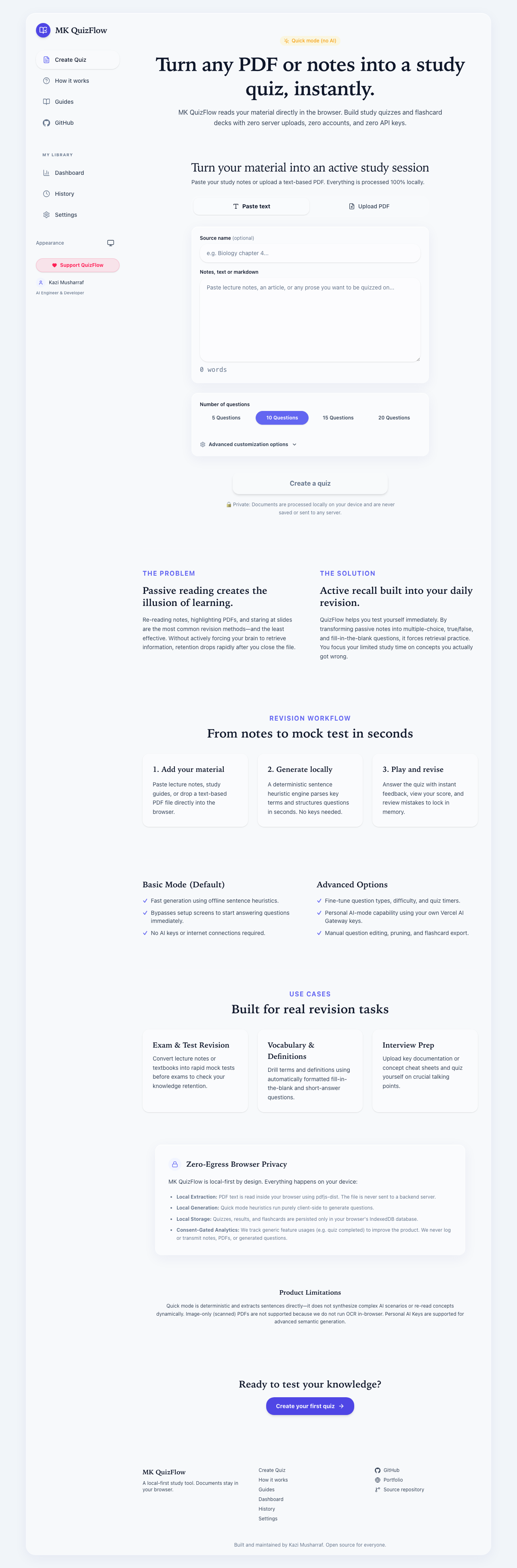
Turn PDFs, notes and pasted text into quizzes, flashcards, practice tests and study material. Paste your material or upload a text-based PDF, choose how many questions you want and which types, and QuizFlow builds a quiz you can play, score and export — or a flashcard deck you can review with spaced repetition.
It works offline in Quick mode with no AI key needed. Nothing about your document leaves your device in Quick mode. An optional AI layer is available for higher-quality generation, and it is always clearly labelled.
Features
- Two ways in. Paste text or markdown, or upload a PDF (drag-and-drop, up to 20 MB). PDF text is extracted in the browser with
pdfjs-dist, with page-range selection and per-page character counts so empty or scanned pages are obvious. Scanned/image-only PDFs get an honest “no extractable text” message — there is no OCR yet. - Quick mode (no AI, deterministic). Sentence and keyword heuristics build multiple-choice, true/false, short-answer and fill-in-the-blank questions. The same input always produces the same output. It is badged as Quick mode everywhere and is never dressed up as AI output.
- Optional AI mode.
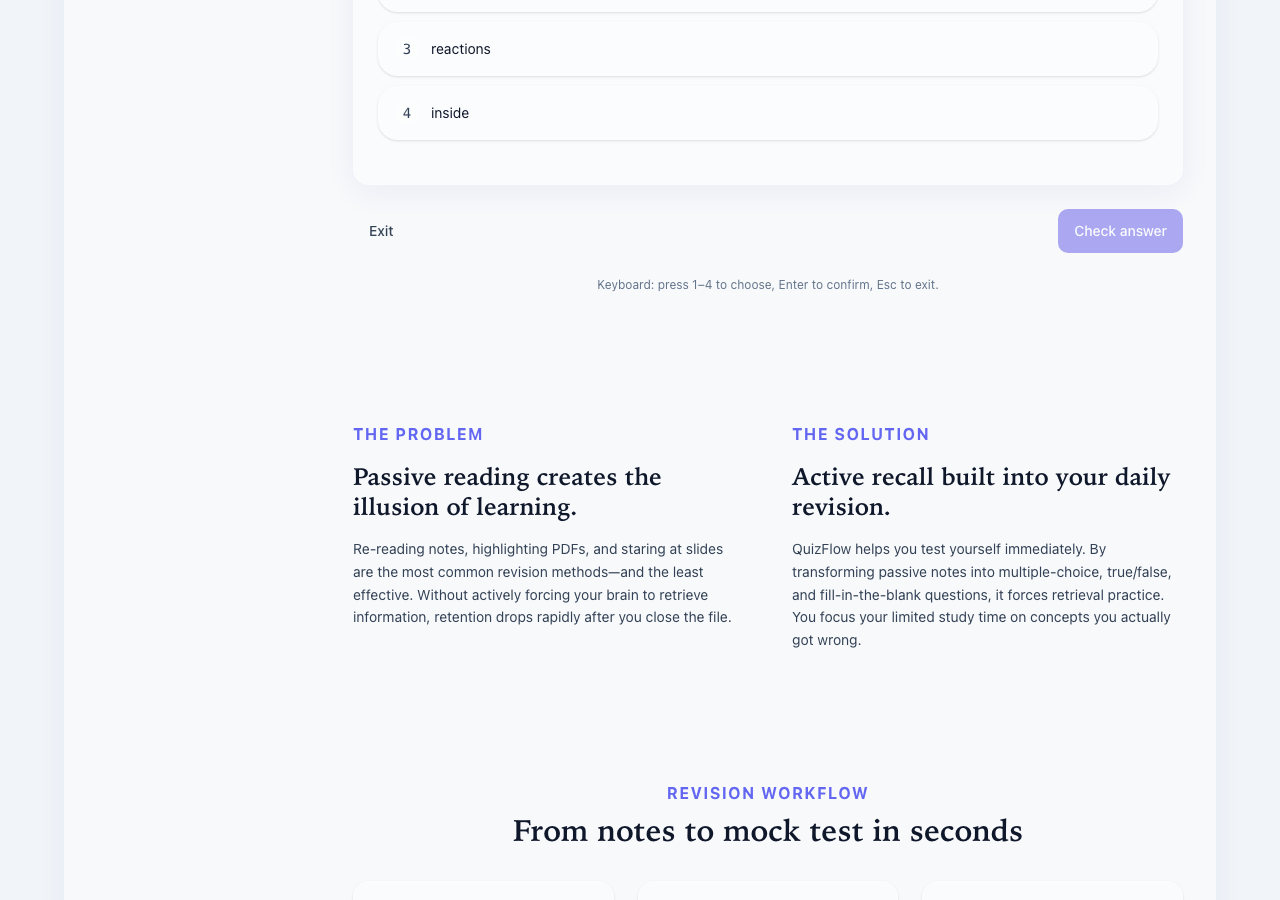
POST /api/ai/*routes through the Vercel AI Gateway for quiz, flashcard, summary, explanation, weak-topic and regenerate capabilities. It uses the deployment’s shared daily allowance first, with a bring-your-own-key fallback. When no credentials are available it degrades to an honest “AI unavailable” state — never fake questions. - Quiz player. MCQ, true/false, short-answer and fill-blank; optional timed mode; per-question feedback; review your mistakes; retake incorrect only; full keyboard support (1–4 to select, Enter to confirm/advance, Esc to exit).
- Question editor. Edit text, options, the correct answer and explanations; reorder with buttons or the keyboard; delete; duplicate detection; and real regeneration per-question or for the whole quiz, with a confirm step before discarding edits.
- Flashcards. A flip UI with a motion-safe crossfade fallback and self-grading (Again / Hard / Good / Easy) that drives a local SM-2-style review queue with honest due counts.
- Export. JSON (versioned and re-importable), CSV, Markdown, and printable HTML for browser print-to-PDF. Exports carry the Quick-mode label when it applies.
- Dashboard and history. Real local stats only — quizzes created, questions answered, accuracy, time studied — with honest empty states before your first quiz. History is searchable and entries reopen in the player or editor.
- Local-first by default. All of your data lives in IndexedDB on your device. There is no account and no server database.
Screenshots
| Home | Quiz player |
|---|---|
 |
 |
Tech stack
- Next.js (App Router) with TypeScript in strict mode.
- Tailwind CSS v4 for styling, with CSS-variable design tokens.
- IndexedDB (via the
idbpackage) for local-first persistence. - Vercel AI Gateway (through the Vercel AI SDK) for the optional AI layer, using gateway model strings so a model swap is a one-line env change.
- Supporting libraries:
pdfjs-dist(in-browser PDF extraction),zod(input validation),lucide-react(icons),clsx+tailwind-merge(class handling). - Tooling: Vitest for unit tests, Playwright for the end-to-end smoke, pnpm as the package manager.
No database, no accounts, no signup. The app is fully usable with zero configuration.
Project structure
Tests live next to the code they cover as *.test.ts files; only the source modules are listed below.
src/
├── app/                         # Next.js App Router — pages, routes and metadata
│   ├── layout.tsx               # Root layout: metadata, theme, consent and analytics wiring
│   ├── page.tsx                 # Landing page
│   ├── globals.css              # Tailwind v4 theme + design tokens
│   ├── loading.tsx              # Global loading UI
│   ├── error.tsx                # Root error boundary
│   ├── not-found.tsx            # Custom 404 page
│   ├── robots.ts                # robots.txt generator
│   ├── sitemap.ts               # XML sitemap generator
│   ├── opengraph-image.tsx      # Open Graph social card (rendered with next/og)
│   ├── twitter-image.tsx        # Twitter/X social card
│   ├── api/ai/[capability]/route.ts  # Serverless AI endpoint: rate-limit → quota → gateway
│   ├── tool/                    # Main quiz workspace (upload → configure → generate → play)
│   ├── flashcards/              # Flashcard deck player
│   ├── dashboard/               # Local stats dashboard
│   ├── history/                 # Past quizzes, decks and results
│   ├── settings/                # Data export/import, consent, BYOK key, ad flag
│   ├── docs/                    # In-app documentation page
│   ├── guides/                  # Guide index + guides/[slug] article pages
│   ├── use-cases/               # Use-case index + use-cases/[slug] pages
│   ├── faq/                     # FAQ (FAQPage structured data)
│   ├── changelog/               # Changelog page
│   ├── about/                   # About the product
│   ├── creator/                 # Creator profile (Person structured data)
│   ├── open-source/             # Open-source page
│   ├── privacy/                 # Privacy policy
│   ├── terms/                   # Terms of use
│   ├── cookies/                 # Cookie policy + consent controls
│   └── contact/                 # Contact page
│
├── components/                  # UI components
│   ├── layout/                  # Header, footer, theme toggle + no-flash theme script,
│   │                            #   consent banner, and analytics loaders (GTM/GA, Vercel)
│   ├── tool/                    # SourceInput (paste/PDF + page range), GenerateConfig,
│   │                            #   QuestionEditor, ExportMenu, and the reserved AdUnit slot
│   ├── player/                  # QuizPlayer (MCQ/TF/short/fill) and QuizResults
│   ├── flashcards/              # FlashcardPlayer (flip + self-grading)
│   ├── analytics/               # TrackOnMount helper
│   └── ui/                      # Design-system primitives: Button, Badge, ConfirmDialog,
│                                #   EmptyState, ProgressRing, icons
│
└── lib/                         # Pure logic, framework-free where possible
    ├── types.ts                 # Shared domain types
    ├── generator.ts             # Deterministic Quick-mode question generator
    ├── text.ts                  # Sentence/keyword text heuristics
    ├── pdf.ts                   # In-browser PDF text extraction (pdfjs-dist)
    ├── scoring.ts               # Quiz scoring
    ├── dedupe.ts                # Duplicate-question detection
    ├── srs.ts                   # SM-2-style spaced-repetition scheduler
    ├── stats.ts                 # Derived dashboard stats from local history
    ├── storage.ts               # IndexedDB persistence behind one interface (idb)
    ├── prefs.ts                 # Small localStorage preferences
    ├── share.ts                 # Share-by-URL encode/decode (zod-validated)
    ├── export.ts                # JSON / CSV / Markdown / printable-HTML exporters
    ├── id.ts                    # crypto.randomUUID id generation (with fallback)
    ├── cn.ts                    # className merge (clsx + tailwind-merge)
    ├── analytics.ts             # Typed track() with the consent gate
    ├── audio.ts                 # Web Audio click sounds
    ├── tips.ts                  # Rotating study tips
    ├── site.ts                  # Site + creator constants
    ├── guides.ts                # Guides content data
    ├── use-cases.ts             # Use-cases content data
    ├── og-image.tsx             # Shared OG image renderer
    └── ai/                      # AI layer: catalog, capabilities, models (env defaults),
                                 #   quota (daily), rate-limit (per-IP), errors, request, client
Getting started
Prerequisites: Node 20+ (Next.js 16 needs Node 20.9+) and pnpm.
pnpm i          # install dependencies
pnpm dev        # start the dev server at http://localhost:3000
pnpm build      # production build
pnpm test       # run the unit tests (Vitest)
Other useful scripts: pnpm lint, pnpm typecheck, pnpm test:coverage, and pnpm e2e (Playwright smoke).
Environment variables
Every variable is optional. The app builds and the deterministic Quick mode works with none of them set — when AI credentials are missing, AI mode shows a graceful “AI unavailable” fallback and everything else keeps working. Copy .env.example to .env.local to set any of them.
| Variable | Purpose | Required? |
|---|---|---|
AI_GATEWAY_API_KEY |
Server Vercel AI Gateway key (vck_…) for AI mode. On Vercel, OIDC can supply this automatically. |
No — unset means Quick mode only |
VERCEL_OIDC_TOKEN |
Ambient AI Gateway credential injected by vercel dev and by Vercel at deploy time. |
No — managed by Vercel, do not set by hand |
AI_MODEL |
Fast-tier gateway model string. | No — defaults to anthropic/claude-haiku-4.5 |
AI_MODEL_QUALITY |
Quality-tier gateway model string. | No — defaults to anthropic/claude-sonnet-4-5 |
NEXT_PUBLIC_SITE_URL |
Canonical/OG base URL for SEO and the sitemap. | No — defaults to https://quizflow.mkazi.live |
NEXT_PUBLIC_GTM_ID |
Google Tag Manager container id. | No — unset disables analytics entirely |
NEXT_PUBLIC_GA_ID |
Google Analytics id. | No — unset disables analytics entirely |
NEXT_PUBLIC_ADSENSE_ENABLED |
Master switch for reserved ad slots. | No — defaults to false (no ad scripts load) |
NEXT_PUBLIC_ADSENSE_CLIENT_ID |
AdSense publisher id, only used when ads are enabled. | No |
NEXT_PUBLIC_SPONSOR_URL |
Optional sponsor/”buy me a coffee” link shown in the fallback ad slot. | No |
Privacy
QuizFlow is local-first. Your material is processed in your browser, and your quizzes, decks, results and settings live in IndexedDB on your device.
- In Quick mode, nothing leaves the browser. PDF text is extracted and questions are generated entirely on your device.
- In AI mode, text is streamed to the serverless route and discarded — it is never written to logs or disk, and documents are never stored server-side.
- Analytics are off by default and only ever run in production after you consent. They record counts, durations and feature names — never document text, quiz content, file names, or keys.
- Bring-your-own-key stays in the browser tab (session memory only), is sent per request as a header, and is never logged or persisted.
See docs/PRIVACY.md and docs/SECURITY.md for the full guarantees and threat model.
Documentation
Deeper reference docs live in docs/:
- ARCHITECTURE.md — system architecture and data flow.
- AI_ARCHITECTURE.md — AI routing, quotas, rate limits and BYOK.
- DATABASE.md — why there is no server database (local-first rationale).
- DEPLOYMENT.md — build pipeline and hosting notes.
- PRIVACY.md — privacy guarantees.
- SECURITY.md — threat model and responsible disclosure.
- PRODUCT_SPEC.md — product spec and acceptance criteria.
- DESIGN_SYSTEM.md — the visual design system.
- ANALYTICS_PLAN.md, SEO_PLAN.md, MONETIZATION_PLAN.md — supporting plans.
- AUDIT.md — the pre-rebuild audit that shaped v2.
- TEST_REPORT.md — real test and coverage output.
Deployment & launch guide
Why Vercel
Vercel is the recommended host and the path this project uses:
- It is the native platform for Next.js App Router — no adapters or custom build config.
- The free (Hobby) tier is enough to run this app.
- The optional AI mode uses serverless functions, which Vercel runs out of the box, and it can supply AI Gateway credentials through OIDC with no key to manage.
- Every branch and pull request gets a preview deployment automatically.
Deploy it
- Fork or clone this repository to your own GitHub account.
- Import the repo into Vercel (New Project → import from GitHub). Vercel detects Next.js and uses
pnpmautomatically. - Set environment variables if you want AI mode or analytics — see the table above. You can skip this entirely; the app deploys and works in Quick mode with nothing set.
- Deploy. Vercel builds and gives you a
*.vercel.appURL (this project’s ismk-quizflow.vercel.app).
Custom domain (quizflow.mkazi.live)
- In the Vercel project, open Settings → Domains and add
quizflow.mkazi.live. -
At the DNS provider (Cloudflare, which manages
mkazi.live), add the record Vercel asks for:A quizflow.mkazi.live 76.76.21.21If you use Cloudflare’s proxy, set this record to DNS only (grey cloud) so Vercel can validate it.
- SSL issues automatically once the DNS record resolves — no manual certificate step.
Future standalone domain (mkquizflow.com)
If QuizFlow graduates to its own domain (candidate: mkquizflow.com):
- Buy the domain and add it in Settings → Domains as the new primary, pointing its apex
Arecord to76.76.21.21(and aCNAMEforwwwtocname.vercel-dns.com). - Keep
quizflow.mkazi.liveattached and set it to redirect to the new primary domain in Vercel’s domain settings, so old links keep working.
Roadmap
- Wire the production AI Gateway key so shared-allowance AI mode is live on the deployment.
- Add an optional OCR path for scanned/image-only PDFs (currently a stated non-goal).
- Expand export targets (Anki and LMS-friendly formats).
- Write more study guides and richer weak-topic analytics from local history.
About the creator
Kazi Musharraf — AI Engineer · Full-Stack Developer · Open-Source Builder.
- GitHub: https://github.com/mk-knight23
- Portfolio: https://www.mkazi.live
License
MIT © 2026 Kazi Musharraf.
Built and maintained by Kazi Musharraf. Open source for everyone.